
RateRewindCancel and rebook a rental car: in the right order
Rebooking
Cancel and rebook a rental car: in the right order
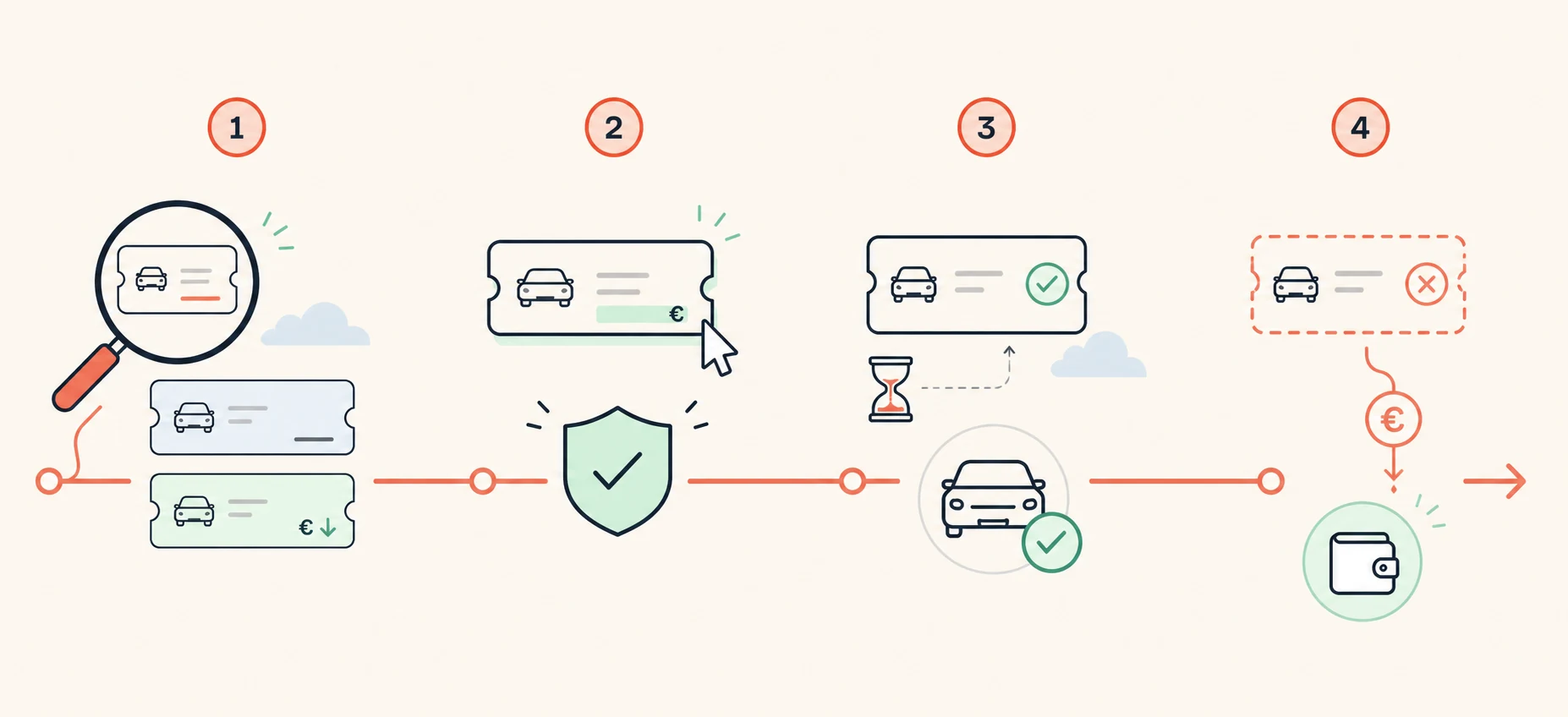
“Just cancel and book again” is the right instinct in the wrong order. The new reservation has to be solid before the old one is gone. Do it the other way round and, in the worst case, you end up with no car at all, because the cheap rate went to someone else in the minutes in between.
Never cancel first. Book the cheaper, comparable offer, wait for the confirmation email, and only then cancel the old reservation, within the deadline stated in it. The other way round you risk ending up with no car at all if the cheap rate disappears between cancelling and rebooking.
Updated: September 9, 2026
Am I allowed to cancel and rebook a rental car?
Yes, if your rate is cancellable. Brokers do not forbid it, and you do not owe anyone a reason. What you will not get is a price adjustment on request: switching always runs as two separate transactions, a new booking and a cancellation of the old one. The order of those two is what decides whether you save money or end up without a vehicle.
What do you check before you start?
Two things. First the cancellation deadline in your confirmation: if it has passed, the rest takes care of itself, because the fee swallows the saving. Second, whether the new offer actually delivers the same thing. Matching station and dates are not enough, since vehicle class, insurance, mileage and payment terms all have to come along. The usual deadlines at the larger brokers are set out in our cancellation overview.
How do you lock in the new offer?
Open the cheaper offer as its own transaction and commit to it. Then wait for the confirmation email and read it once: do station, date, time, vehicle class and insurance cover match what you were shown? Only once that email exists do you have the car. A filled basket, a reservation page or your bank's payment authorisation are not a booking confirmation.
When do you cancel the old booking?
Right after you have checked the new confirmation, not shortly before pickup. Two live reservations cost you nothing while both are cancellable, but the closer pickup gets, the tighter the deadline on the old one becomes. Cancel through the broker's customer account or the cancellation link in the original email. Keep the cancellation confirmation until the refund shows up on your statement.
What if the supplier blocks two reservations?
It is rare but it happens: some suppliers reject two bookings in the same name for the same period at the same station, because the system suspects an accidental duplicate. If you only notice at the second booking attempt, ask the new broker's support before you delete the one confirmation you have. Often a different broker, or a different station in the same city, solves it.
Modify the booking, or cancel and rebook?
Many brokers offer both, and the modify button looks more convenient. It is not a price adjustment, though: your booking is recalculated at the rate valid today, and if that has risen in the meantime, you pay the difference. When all you want is a lower price for the same requirement, going through a new booking and cancelling afterwards is usually the clearer route. You see exactly what you get and what it costs before you commit.
And if the price keeps falling afterwards?
You can do the same thing again, as long as the new booking is cancellable too. It only makes sense while the gap stays large enough, because every switch means another refund to wait for and extras to select again. Our algorithm therefore avoids writing to you over every small movement, and comes back only for a noticeably better find.
Frequently asked questions
- Does it cost anything to cancel and rebook a rental car?
- On a cancellable rate, cancelled within the deadline, there is no fee. Costs only arise if you miss the deadline or hold a prepaid rate without a flex option. The process itself is free; you simply pay the new, lower price.
- Can I rebook more cheaply with the same broker?
- Yes, and that is the easiest case, because you already know the process. Just make sure you create the new booking as a separate transaction rather than modifying the existing one. Otherwise the old reservation gets touched before the new one stands.
- What if the new booking is confirmed differently than shown?
- Then you cancel the new one instead of the old one. As long as you have not touched the original reservation, there are no consequences: you keep your old booking and have lost nothing. That is exactly what this order is for.
- Should I keep both bookings just in case?
- No. Once the new confirmation checks out, cancel the old one promptly. Two active reservations mainly raise the risk that the old one's cancellation deadline slips past unnoticed and turns a free cancellation into a paid one.
- Does this apply to a car from a flight or holiday package?
- Usually not. If the rental car is part of a package holiday or tied to a flight booking, it often cannot be cancelled on its own, and a change affects the whole trip. In that case check first whether the car is held as a separate item with its own booking number.
Already have a cancellable booking?
Add it. We keep looking and only contact you when an equivalent offer is cheaper.
After signing in, you can add your booking straight away.
Links to booking providers are affiliate links. They do not change the price you pay. RateRewind does not rebook automatically.